
Cloud Cost Control & Architecture
This post is about the following:
Get trained to know what you're talking about
Use cloud architectural principles and not whatever clever, or venerable design pattern you think is better
There's no excuse for being surprised by cloud costs...there's lots of information available...use it
Here we go!
Let's talk about cloud cost control and the ways it's linked to, and indeed, I'd argue a central part of, good public cloud architecting principles.
Now that we're mostly past the stage of CIOs declaring a 'never cloud' policy there's a push for organizations of all sizes to reduce - or even completely eliminate - their on-premises data center footprint in favor of public cloud which chiefly means AWS, Azure and Google Cloud Platform.
But this push is not always accompanied by the knowledge or appetite for due diligence required to intelligently build cloud solutions with reduced friction, system resiliency and cost minimization.
Here's an example of what I mean; I've used this story several times before because it's an illustration of a pattern - how things go wrong with cloud adoptions - so it's worth telling again.
North American firm Poseidon Chocolates is a multinational seller of popular candies. Their products are found in stores around the world and they have a correspondingly complex and sprawling IT estate hosting a wide variety of applications - internal systems, partner facing applications and customer facing apps.
This means databases. Lots and lots of databases. So many databases and so complex and expensive to manage it wasn't a surprise that when the CIO said, 'we're moving to the cloud' IT's first migration target was the company's vast database estate.
Now here's where things go a bit wrong.
Years of experience with on-premises database servers built on VMWare, and what I'll call a server-centric approach to application deployment led Poseidon's IT personnel to assume that building virtual machines in Azure (the platform of choice for their efforts) was the right approach.
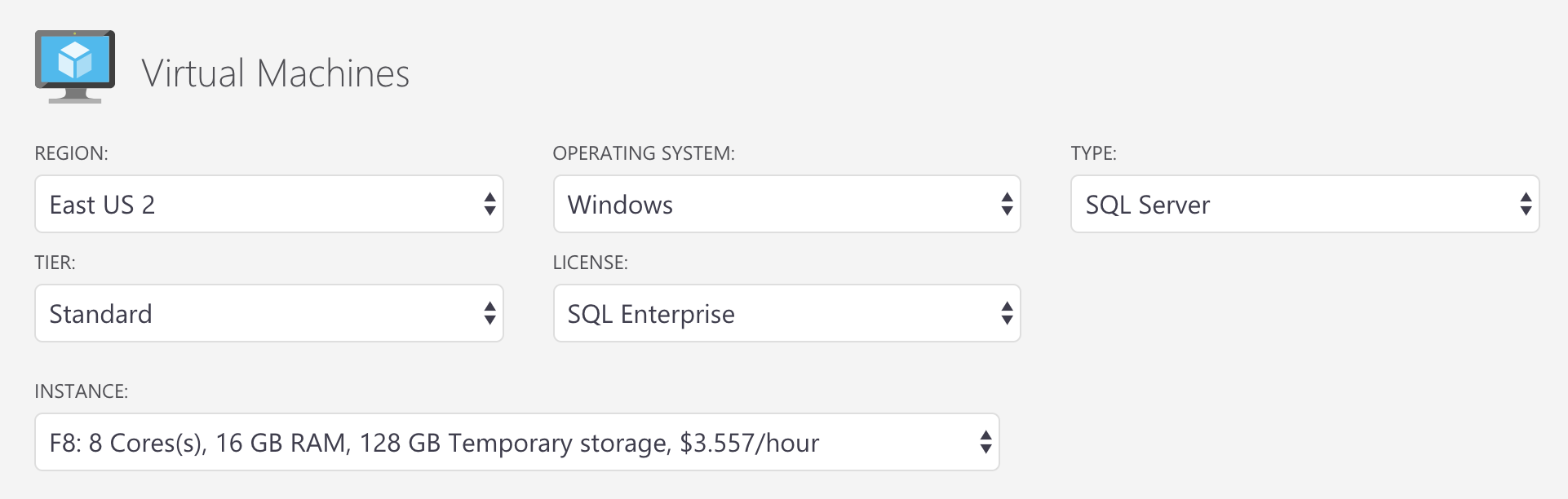
To get started, two servers (in a failover configuration) were created in Azure with the following specifications:
8 CPUs
16 GB RAM
Two SSD drives, 4 TB each
This configuration pretty closely matched a database platform running on-premises which hosted a business critical SQL Server-based platform. The goal was to re-platform this environment to Azure and, it was assumed, enjoy a lower runtime cost.
To provide the desired performance, Azure F-series virtual machines (which are compute optimized) were deployed with SQL Server installed on the VMs - exactly as would be done on-premises.
From a purely on-premises technology stack point of view, this seemed like a fairly good set-up with performance, excess capacity for data and demand growth taken into account. The database and server engineering teams felt pretty good; as directed, they'd begun the process of 'moving to the cloud' with, they thought, a modest amount of upskilling required.
Then the bill came.
The monthly cost for two of these VMs was over ten thousand dollars. Poseidon Chocolates database team built about 50 of these servers. The total runtime cost was dramatic, to say the least.
Of course, the CIO was angry and embarrassed (there were uncomfortable conversations with the CIO and CFO) and the server and database teams bounced between declaring public cloud financially unsustainable and blaming each other for a major mistake.
Where did Poseidon Chocolates go wrong?
Let's walk through the ways.
One.) The Lack of Training
No one in leadership or IT took seriously the need for upskilling. The assumption was that the years of experience gained architecting solutions on-premises was sufficient to build solutions in the cloud. Because of the IT team's server-centric approach, this seemed to be a reasonable assumption - after all, if you've been spinning up virtual networks and virtual machines on-premises for years, what's to learn? As it turned out, quite a lot.
Two.) Not Using Cloud-native architectural design principles
Point two follows from point one as day follows night; the lack of training (and perhaps even worse, the lack of serious consideration for any type of deep learning while entering this new environment) meant that no one understood the full range of available options or the principles described in documents such as the AWS Well Architected Framework and the Azure Application Architecture Guide.
This lack of knowledge, combined with the server-centric approach mentioned earlier, led Poseidon's IT team away from a consideration of PaaS options such as Azure SQL or Cosmos DB and towards time tested - but not cloud-native - methods such as running databases from virtual machines.
Powerful 'serverless' capabilities such as an Azure Web App combined with a PaaS database were nowhere in Poseidon's list of plans.
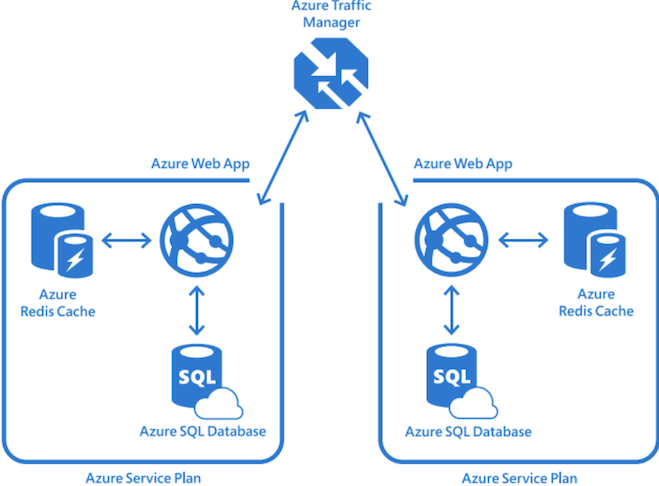
The image shown above (from Cloud References) illustrates the type of cloud-native design I'm talking about. Here, instead of VM hosted web sites, there are geo-replicated Azure Web Apps served from behind Azure Traffic Manager which provides geo-relevant DNS servicing. Azure Redis Cache is deployed to improve responsiveness and Azure SQL PaaS acts as the database layer.
To use this design pattern, you first have to know it's possible. And to know that, you must be trained.
Three.) Not performing the most basic due diligence for estimating cost
Poseidon Chocolate's IT staff was caught off-guard by the high cost of the solutions they deployed, but they shouldn't have been.
The Azure Pricing Calculator provides a good approximation of how much the services you use will cost. Let's return to the virtual machine configuration Poseidon's IT chose:
8 CPUs
16 GB RAM
Two SSD drives, 4 TB each
This translated into an F-series Azure virtual machine with matching specifications. Plugging this into the Azure Pricing Calculator produced the following (note the hourly runtime cost):
Poseidon deployed two of these servers (in the same Azure region and not using a Scale Set deployed with Availability Zones so not truly fault tolerant) which the Pricing Calculator estimated to cost over $5,000 per month:
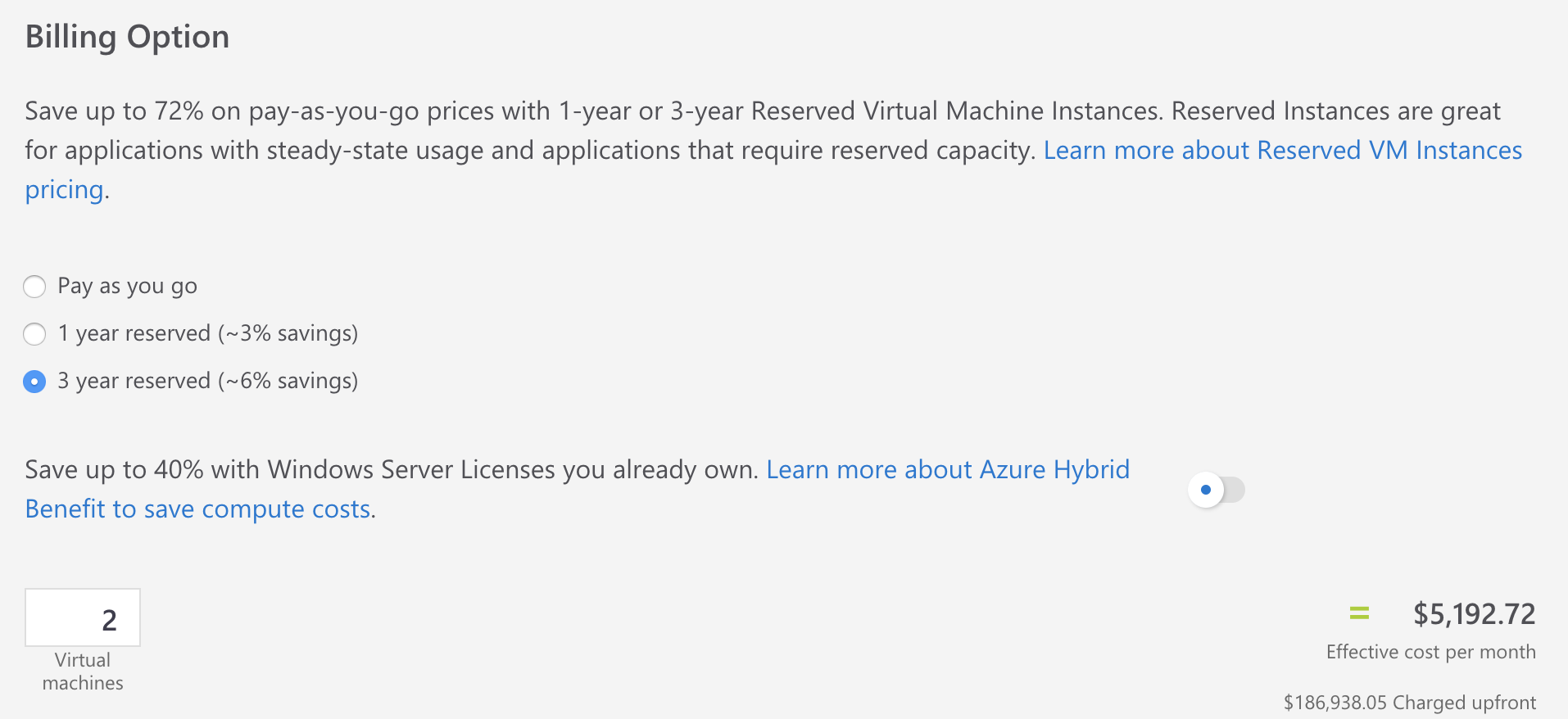
Even the use of reserved instances did not make the monthly runtime cost attractive.
Adding the high-speed virtual disks Poseidon configured increased the estimated cost by several hundred dollars per month:
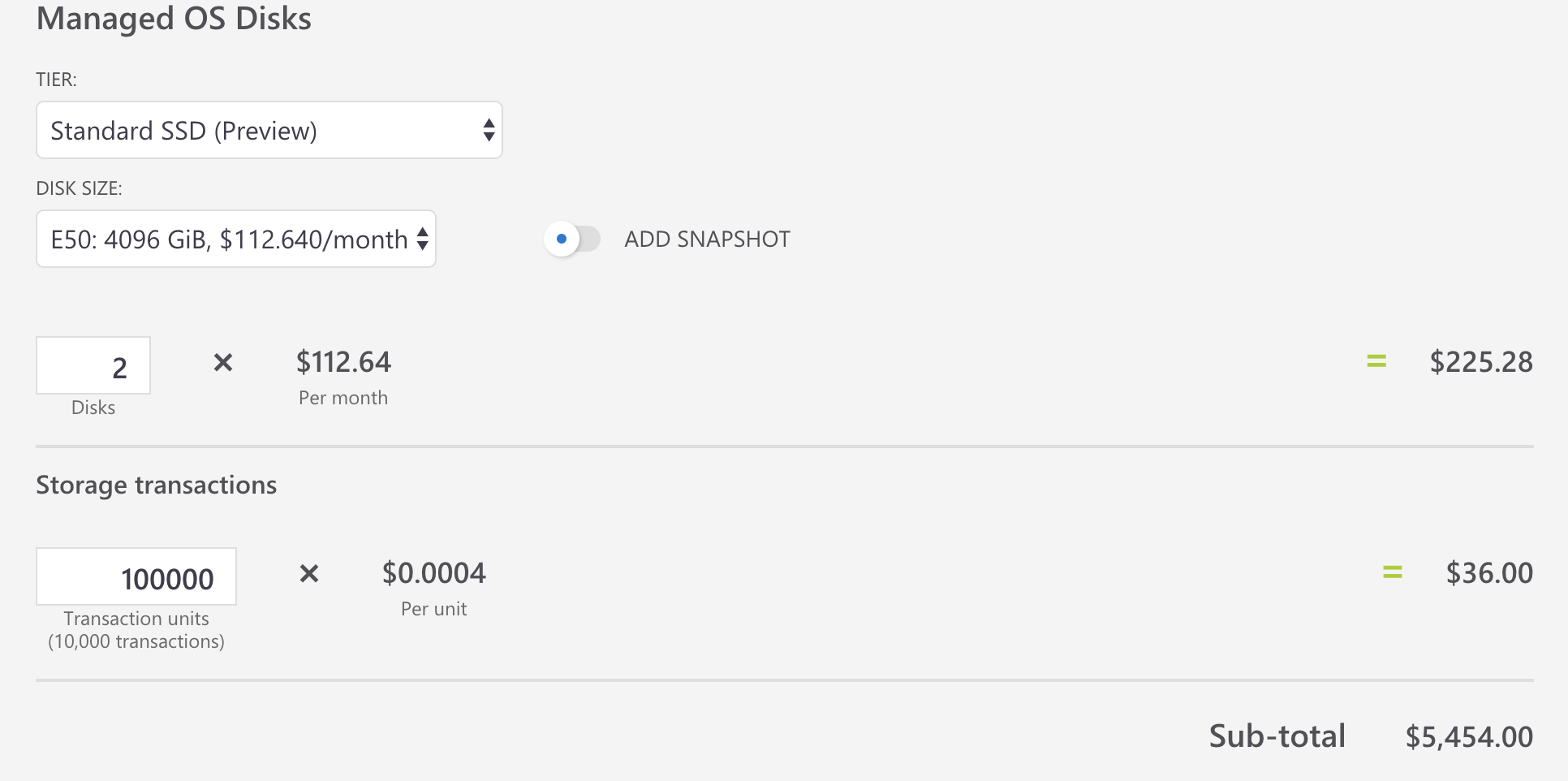
Here we see an estimated runtime cost of almost $5500 per month for only two virtual machines. Poseidon deployed many such VMs without regard (initially) for cost and without performing the basic level of cost estimation the Azure Pricing Calculator provides.
The 'sticker shock' that resulted from this oversight was entirely preventable.
Beyond the Pricing Calculator, Azure (and other cloud platforms) hosts a billing API which enables the programmatic gathering of detailed consumption data. You can know what's generating costs at a detailed level. This is particularly useful when combined with resource tagging. It's also possible to create billing alerts and set spending caps. There are many, many options (including the use of cost control and monitoring tools such as Azure Cost Management, formerly known as Cloudyn).
We've covered a bit of territory so let's repeat this post's three major themes:
One.) Get trained to know what you're doing (for example, check out A Cloud Guru and Cloud Academy)
Two.) Choose the right architecture, based on cloud platform design principles such as those found in the AWS Well Architected Framework, Azure Architecture Guide and the Google Cloud White papers)
Three.) Estimate costs before deploying using the Azure Pricing Calculator, AWS Pricing Calculator or Google Cloud Platform Pricing Calculator...monitor costs after deployment...think about cost as a key element of your architectural considerations
Before signing off, I'll leave you with this excellent guide to how to choose what on Azure. Good luck with your cloud journey!